Sitecore Scheduled Publish
Schedule publish and unpublish of Sitecore items for a future date and time, with email notifications. An open-source module for the Sitecore Content Editor that supports Sitecore XM and XP 10.2 – 10.5, including Sitecore 10.5 with Package Designer disabled. The 10.5 release ships as Items as Resources (IAR) files, and is available as a NuGet package and as Docker images for Windows Server 2025 and 2022.




| Get it | |
|---|---|
| NuGet | SCScheduledPublish: dotnet add package SCScheduledPublish |
| Docker | nehemiah/sitecore-scheduled-publish: Sitecore module asset image (10.5-ltsc2025, 10.5-ltsc2022) |
| Zip | GitHub releases: unzip into the webroot, no Installation Wizard needed |
| Docs | Install on Sitecore 10.5 · Upgrade notes · Configuration |
| Blog | Sitecore Scheduled Publish 10.5: shipping without Package Designer (IAR, NuGet, Docker, upgrade cleanup) |
Overview:
The purpose of Scheduled Publish is to give the content editor the option to delay the publishing of an item for a future point in time. Thus, a page or a feature that should go live at a specific time can be created and populated in Sitecore and previewed long before it goes live without the risk of an accidental publish before the specific time. Moreover, there is no need for a content-editor to go to Sitecore and manually publish something at an inconvenient hour, e.g. a New Year’s announcement. Scheduled Publish intends to give the content-editor all features of a normal publish with the addition of automation, timing and notifications.
Source:
The source targets Sitecore 10.5 (.NET Framework 4.8.1, Sitecore.Kernel 10.5.0).
| Path | Contents |
|---|---|
src/Foundation/ScheduledPublish/code |
Module code (ScheduledPublish.csproj), config, dialog XMLs, NuGet build targets |
src/Foundation/ScheduledPublish/serialization |
Module items as Sitecore Content Serialization (SCS) YAML: templates, settings, task, core ribbon/gutter/field type |
ScheduledPublish.module.json, sitecore.json |
SCS module definition and Sitecore CLI configuration (CLI 5.2.113 in .config/dotnet-tools.json) |
scripts/Build-Package.ps1 |
Builds the release: IAR files, DLL, zip, NuGet package, Docker images |
docker/ |
Dockerfile and Docker Hub overview for the module asset images |
Prerequisites: .NET SDK (8 or later), the .NET Framework 4.8.1 targeting pack, and access to the Sitecore NuGet feed. The feed is configured in NuGet.config. For Docker images, you also need Docker in Windows-container mode.
Serialized items. The items in serialization/ are the source of truth for the module’s items:
- Development: push them to a local instance with
dotnet sitecore ser push -i ScheduledPublish, and pull changes back withdotnet sitecore ser pull -i ScheduledPublish. - Releases: don’t push items. The same YAML is compiled into Items as Resources files with
dotnet sitecore itemres create, whichBuild-Package.ps1does for you.
After changing items, check that the module still loads from IAR on a clean instance. See Building the release.
Setup:
| Sitecore version | Install options |
|---|---|
| 10.5 | NuGet, file-drop IAR zip, Docker image, source + Sitecore CLI (see Sitecore 10.5) |
| 10.2 – 10.4.1 | Sitecore package via Installation Wizard (Packages), Docker image, source |
Sitecore 10.5
For the background and a walkthrough, see the blog post Sitecore Scheduled Publish 10.5: Shipping Without Package Designer.
Sitecore 10.5 disables Package Designer, and keeping it disabled is recommended. Starting with 10.5, Scheduled Publish ships only as an Items as Resources (IAR) build. All module items (templates, settings, task schedule, core ribbon/gutter/field types) are in .dat resource files, so the module installs as plain files. No Package Designer, Installation Wizard, or database writes are needed.
The module consists of these files:
bin/ScheduledPublish.dll
App_Config/Include/ZZ_ScheduledPublish/ZZ_ScheduledPublishControl.config
App_Data/items/master/items.master.schedule.publish.dat
App_Data/items/core/items.core.schedule.publish.dat
sitecore/shell/Applications/Content Manager/Dialogs/Schedule Publish/Schedule Publish.xml
sitecore/shell/Applications/Content Manager/Dialogs/Edit Scheduled Publish/Edit Scheduled Publish.xml
Pick one of the following:
-
NuGet (recommended for solutions with a CI/CD pipeline). Add the package to your Sitecore web project:
dotnet add package SCScheduledPublishTo stay on the Sitecore 10.5 line and pick up module updates (10.5.0.x), use a floating version in the project file:
<PackageReference Include="SCScheduledPublish" Version="10.5.0.*" />.The DLL is referenced as usual. The config, IAR and dialog files are added to the web project’s publish output, at the paths listed above. Deploy the web project the way you normally do (Web Deploy, PaaS pipeline, or Docker build).
-
File-drop zip. Download
Sitecore Schedule Publish-10.5.0 IAR (files).zipfrom Packages or the GitHub release, and extract it into the CM (and CD) webroot. On Azure PaaS, use Kudu / the zip deploy API. In a Docker image, add it to your CM Dockerfile:COPY ./scheduled-publish/ C:/inetpub/wwwroot/Recycle the app pool (or restart the container) afterwards.
- Docker image. A Sitecore module asset image (CM only) is available on Docker Hub:
nehemiah/sitecore-scheduled-publish:10.5-ltsc2025: Windows Server 2025 base (supported from Sitecore 10.5)nehemiah/sitecore-scheduled-publish:10.5-ltsc2022: Windows Server 2022 basenehemiah/sitecore-scheduled-publish:latest: same as10.5-ltsc2022
Sitecore 10.5 no longer supports Windows Server 2019 (1809 / ltsc2019) containers, so there is no 10.5
1809image.The image contains the module files under
\module\cm\content. Copy them into your CM image:ARG BASE_IMAGE ARG SCHEDULED_PUBLISH_IMAGE=nehemiah/sitecore-scheduled-publish:10.5-ltsc2022 FROM ${SCHEDULED_PUBLISH_IMAGE} AS scheduledpublish FROM ${BASE_IMAGE} ... COPY --from=scheduledpublish \module\cm\content .\ - From source. Clone the repo and add the project to your solution. Deploy the files, then either:
- push the items to the database with the Sitecore CLI:
dotnet sitecore ser push -i ScheduledPublish, or - generate the IAR files:
dotnet sitecore itemres create -i ScheduledPublish -o <webroot>/App_Data/items/schedule.publish, then move eachitems.<db>.schedule.publish.datintoApp_Data/items/<db>/.
- push the items to the database with the Sitecore CLI:
Verify the install:
- The Content Editor Publish ribbon shows the Scheduled Publish strip.
/sitecore/system/Tasks/Schedules/ScheduledPublishTaskand/sitecore/system/Modules/Scheduled Publishexist./sitecore/admin/showconfig.aspxcontains theZZ_ScheduledPublishsettings.
Upgrading: do database copies of the module items need cleanup?
With IAR, Sitecore reads the module’s items from the .dat files. However, if an item with the same ID also exists in the database, the database copy takes precedence. Module changes shipped in the .dat files then stay hidden for that item.
| Situation | Cleanup needed? |
|---|---|
| Fresh install | No. Nothing is in the database. |
Upgrade from an Installation Wizard package or a ser push install (10.2 / 10.3, or the non-IAR 10.4 / 10.4.1 packages) |
Yes. All module items are in the database and override the new IAR items, including templates, ribbon and field types. |
| Upgrade from a 10.4 / 10.4.1 IAR install | Usually no. Only items written at runtime are in the database (see below). Keep them. |
Some database copies are expected and should be kept:
/sitecore/system/Tasks/Schedules/ScheduledPublishTask: Sitecore copies it to the database the first time the task runs (to save Last run), and does it again after every cleanup. The log showsDefault item ScheduledPublishTask (...) was migrated to head provider.- Settings an admin changed under
/sitecore/system/Modules/Scheduled Publish, such as email and section settings. Editing an IAR item saves a database copy that holds your values. - Editors’ schedules under
/sitecore/system/Modules/Scheduled Publish/Publish Schedules. These are normal database items, not part of the IAR files.
To clean up after upgrading from a wizard or ser push install, use the Sitecore CLI (dotnet sitecore login to the CM first). itemres cleanup only removes database copies of items that also exist in IAR files:
- Preview what would be removed:
dotnet sitecore itemres cleanup --what-if - Remove copies that are identical to the IAR version. Customized items, such as edited settings, are skipped:
dotnet sitecore itemres cleanup - Force-remove only the module definitions that nobody edits by hand, so the new versions take effect. Preview each path with
--what-iffirst:dotnet sitecore itemres cleanup -p "/sitecore/templates/Scheduled Publish" -r --forceDo the same for the core-database definitions in
ScheduledPublish.module.json:/sitecore/content/Applications/Content Editor/Ribbons/Chunks/Scheduled Publish.../Ribbons/Strips/Publish/Scheduled Publish.../Gutters/Scheduled Publish/sitecore/system/Field types/Custom Field Types/Roles Multilist
Or delete those core items by hand.
Never use --force on /sitecore/system/Modules/Scheduled Publish. It would reset your email and section settings to the defaults.
Uninstall: delete the six files listed above and recycle the app pool.
Sitecore 10.2 – 10.4.1
- Install the package for your version from Packages with the Installation Wizard. From 10.3 onward, an IAR variant is available.
- Clone source and add it in solution.
- Use Docker Image from Docker Hub.
nehemiah/sitecore-scheduled-publish:10.4.1-ltsc2022- v10.4.1 & IARnehemiah/sitecore-scheduled-publish:10.4.1-1809- v10.4.1 & IARnehemiah/sitecore-scheduled-publish:10.4-ltsc2022- v10.4 & IARnehemiah/sitecore-scheduled-publish:10.4-1809- v10.4 & IARnehemiah/sitecore-scheduled-publish:10.3-1809- v10.3nehemiah/sitecore-scheduled-publish:10.2-1809- v10.2
Building the release (maintainers)
pwsh ./scripts/Build-Package.ps1 -Version 10.5.0
The script generates the IAR files with dotnet sitecore itemres create, builds the DLL, and writes the file-drop zip and the .nupkg to artifacts/. It also copies the zip to Packages/. Package Designer isn’t used.
To also build the Docker module asset images, run on Windows with Docker in Windows-container mode:
pwsh ./scripts/Build-Package.ps1 -Version 10.5.0 -DockerRepository nehemiah/sitecore-scheduled-publish
docker push nehemiah/sitecore-scheduled-publish:10.5-ltsc2025
docker push nehemiah/sitecore-scheduled-publish:10.5-ltsc2022
This builds one image per base in -DockerBases (default ltsc2025, ltsc2022) from docker/Dockerfile, tagged <version>-<base>. The images carry OCI labels for version, source commit, build date and license. The Docker Hub overview is kept in docker/README.dockerhub.md; paste it into the repository’s Overview on Docker Hub when tags change. The images contain \module\cm\content, the same files as the zip. The docker asset image creator isn’t needed for 10.5: it converts Installation Wizard packages, and the 10.5 release is already plain files.
Versioning. The version is <Sitecore version>[.<module revision>]:
| Version | Meaning |
|---|---|
10.5.0 |
First release for Sitecore 10.5.0 |
10.5.0.1, 10.5.0.2, … |
Module updates (fixes, features) for Sitecore 10.5.0 |
10.5.1 |
First release for Sitecore 10.5.1, if Sitecore ships one |
NuGet sorts these correctly (10.5.0 < 10.5.0.1 < 10.5.1). The Docker tag 10.5-<base> always points to the newest build for Sitecore 10.5. A module revision also gets an exact tag, such as 10.5.0.1-ltsc2025. To release a module update:
git tag Sitecore_10.5.0.1
git push origin Sitecore_10.5.0.1
pwsh ./scripts/Build-Package.ps1 -Version 10.5.0.1 -DockerRepository nehemiah/sitecore-scheduled-publish
Then push the Docker tags the script lists.
Pushing a Sitecore_10.5* tag runs .github/workflows/release.yml. That workflow builds the same artifacts, attaches them to a GitHub release, and publishes the NuGet package to nuget.org with Trusted Publishing, so no API key is stored in the repo.
Features:
- Scheduled Publish
- Scheduled Unpublish
- Edit publish schedule
- Date and time can be customized
- Warning if the content-editor selects a date that has already passed
- Check if the item is in a valid publishing state
- Check if the item’s publishing restrictions allow publishing according to the desired schedule
- Target database to which to publish
- Language versions which to publish
- Publish modes
- Publish Children
- Frequency of checks whether there are items queued for publishing
- Simple interface
- Customizable email notifications
Guide:
This is how the Scheduled Publish strip in the Publish Ribbon:

Content-editors can still use the well-known Publish button for all publish methods they are used to. The Schedule Publish button is what is used only for scheduling a future publish. The Schedule Publish strip consists of three buttons:
- Schedule Publish button for scheduling a future publishing of the current item
- Schedule Unpublish button for scheduling a future unpublishing of the current item
- Edit Schedule button where the content editor can review, edit and delete any of the existing schedules for any items.
Schedule Publish:
This is how the Scheduled Publish dialog looks like:
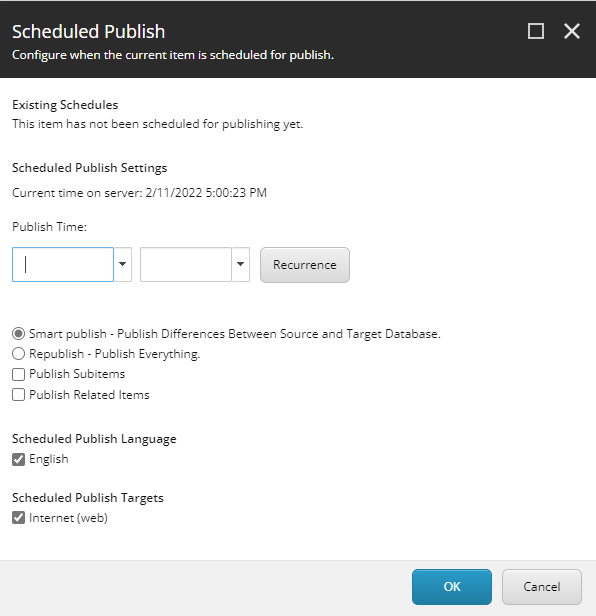
Please note that the current server time will be used when scheduling and it is indicated in the Scheduled Publish Settings block.
Any existing schedules for the selected item will display in order in the Existing Schedules block. If there are none, this will be indicated.
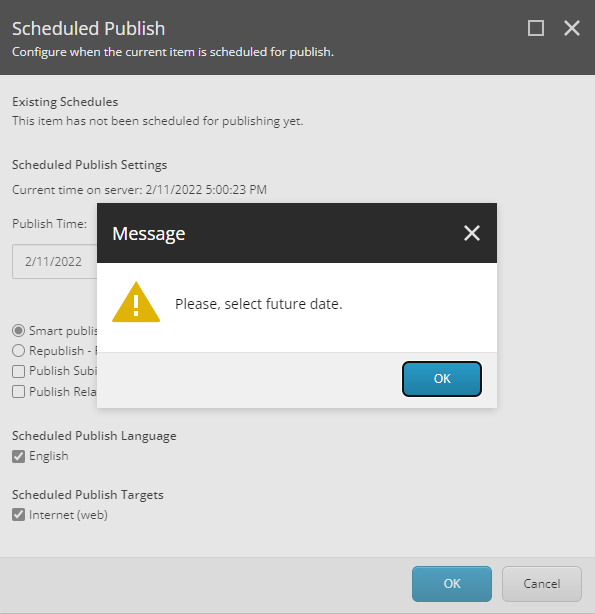
As you see the input is fairly common to Sitecore’s Publish, with the addition of two dropdown menus. From the first drop down the content-editors choose a date when to publish. If they choose a date that has passed, they will receive a warning and be returned to the dialog again until they choose a valid date:
From the second dropdown, content-editors should choose an approximate time for publishing. It is approximate since the actual time of publishing will be the time they set +/- the frequency of the check for items for publishing queued.
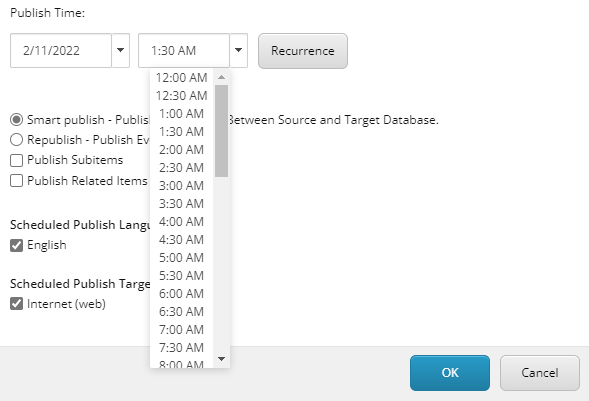
Sitecore displays only hours and halves, but they can be manually edited afterwards, as long as the time format is kept.
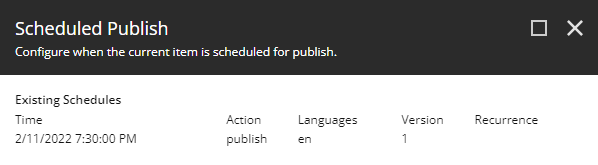
If there are already scheduled publishes for the particular item, a list of these will appear above. The list will show all dates and corresponding hours for publishing for the item in order.
Schedule Unpublish:
The Schedule Unpublish dialog is identical to the Schedule Publish one, only it will remove an item from the website at the selected time.
Edit Publish:
The Edit Schedule button will pop the Edit Scheduled Publishing dialog.
Note: this dialog will list all scheduled publishes by date, not just the scheduled publishes for the currently selected item.
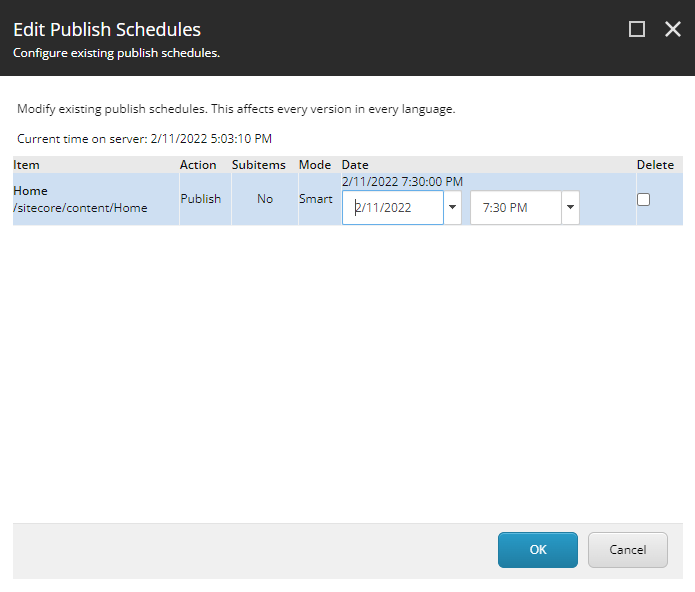
The first column – Item - shows the name of the item and its path, since there may be items with the same name in different locations, especially in a multi-site environment.
The second column – Action – notifies whether the item is scheduled for Publish or Unpublish.
The third column – Date – first shows the current date and time of the schedule, and then two drop down menus for date and time respectively. The first line will not change when you select a different value below – it is just for reference. If you save the new value for any item, the first line will display this new value on reopening the Edit Scheduled Publishing dialog.
The fourth column – Delete – consists of a checkbox. Checking that checkbox will delete the selected schedule upon hitting ‘OK’.
Publish Notification:
Scheduled Publish can be customized to send a notification to the content editor who assigned it and other users when a publish takes place. The email settings can be found under Sitecore/System/Modules/Scheduled Publish. The Settings item contains a checkbox whether email notifications should be sent upon publish.
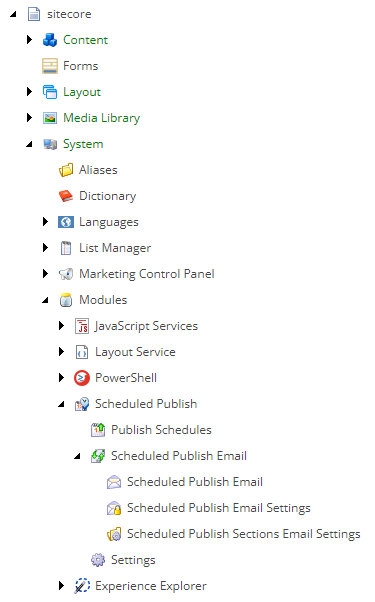
The Scheduled Publish Email Settings item contains mail server info. It can be used to input a mail server or to set a mail server from web.config to be used. Read access to this item can be denied to some content-editors.
The Scheduled Publish Email item contains all fields for a nice, content-managed email.
If notification is enabled, the content-editor who assigned scheduled publish on an item will always receive an email in the mailbox they have input in their Sitecore profile. Additionally, the “To” field can accept a list of comma-separated email addresses. These emails will receive an email on every scheduled publish.
The name of the published item can be added to the Subject of the received email using the “[item]” placeholder for it.
Email Tokens:
There are several placeholders available in the Message field as well so the mail message’s body is very flexible. It can contain anything the content-editor inputs, plus allows the following replacements:
[id] - the id of the item being published
[item] - name of the item being published
[path] - path of the item being published in the content tree
[date] - date when the publishing took place
[time] - the time when the publishing took place
[version] - the version of the item which was published
Job Interval Configuration:
This module utilizes a scheduled task in the master database to manage content publishing. This task processes pending publish requests at regular intervals, defined by both global scheduling frequency and individual settings at the master database agent level. To ensure optimal performance, carefully consider the impact of increasing the frequency, as it can add load to the Content Management (CM) instance.
<scheduling>
	<!--  Time between checking for scheduled tasks waiting to execute  -->
	<!-- SCHEDULAR GLOBAL INTERVAL TIME -->
	<frequency>00:00:05</frequency>
	<!--  An agent that processes scheduled tasks embedded as items in the master database.  -->
	<!-- SCHEDULAR MASTER DB INTERVAL TIME -->
	<agent name="Master_Database_Agent" type="Sitecore.Tasks.DatabaseAgent" method="Run" interval="00:10:00" />
</scheduling>
Credits
Sitecore Scheduled Publish was originally created by Hedgehog Development. That repository and its original documentation remain available. This repository is the actively maintained version, and adds Sitecore 10.x support, IAR packaging, NuGet, Docker images, and further enhancements. It’s licensed under Apache-2.0, and the original copyright notices are retained.